Virtual accounts
Introduction
The Virtual Account API provides comprehensive management for virtual accounts, enabling operations such as account provisioning, transaction confirmation, and more. This API is ideal for use cases involving financial institutions, payment gateways, and e-commerce platforms, offering robust support for generating and managing virtual accounts tied to invoices and checkouts. For detailed information, please refer to the individual endpoint descriptions.
Payment lifecycle using a virtual account number
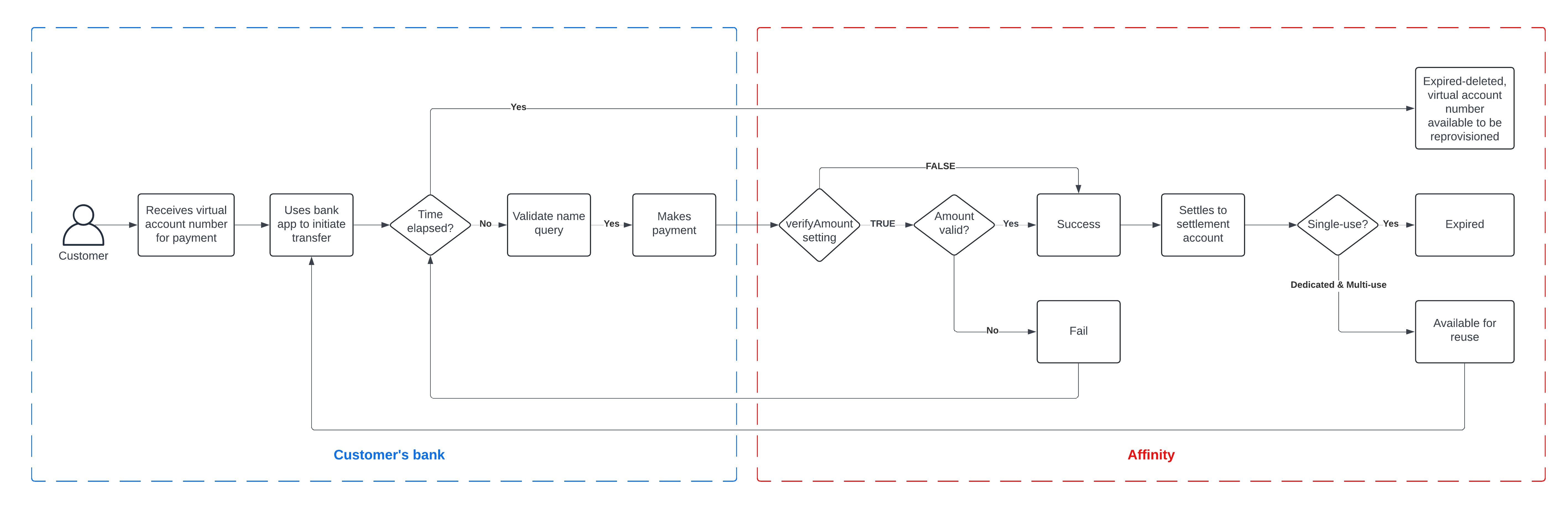
Endpoints
Endpoint 1: Provision virtual account
Description: This endpoint is used to provision a virtual account
Method: POST
URL:
/v-accounts/provisionRequest Parameters:
Name | Type | Description | Default value | In | |
|---|---|---|---|---|---|
1. |
| string ENUM:
| Configuration on how the virtual account should operate. |
| body |
2. |
| number | body | ||
3. |
| integer | in minutes, max 1440 (24 hours) |
| body |
4. |
| string | body | ||
5. |
| string | Value from auth server (via token) | body | |
6. |
| string | Value from auth server (via token) | body | |
7. |
| string | Name of Institution to show when performing a name query on the account number | body | |
8. |
| boolean | A boolean to validate if payments to the virtual account number match the provisioned amount. Applies only to single-use virtual account numbers. |
|
Response (Success: 200)
Name | Type | Description | |
|---|---|---|---|
1. |
| string | |
2. |
| string | |
3. |
| number | |
4. |
| string | |
5. |
| string | |
6. |
| string | |
7. |
| string ENUM:
| |
8. |
| string ENUM:
| |
9. |
| string | |
10. |
| boolean |
Endpoint 2: Virtual account status query
Description: This endpoint is used to get the status of a virtual account
Method: GET
URL:
/v-accounts/status-query/{virtual_account}Request Parameters:
Name | Type | Description | Default value | In | |
|---|---|---|---|---|---|
1. |
| string | path |
Response (Success: 200)
Name | Type | Description | |
|---|---|---|---|
1. |
| string | |
2. |
| string | |
3. |
| string | |
4. |
| string | |
5. |
| boolean |
Endpoint 3: List virtual accounts
Description: This endpoint is used to get the list of virtual accounts
Method: GET
URL:
/v-accounts/virtual-accountsRequest Parameters:
Name | Type | Description | Default value | In | |
|---|---|---|---|---|---|
1. |
| integer | path | ||
2. |
| string | |||
3. |
| string |
Response (Success: 200)
Name | Type | Description | |
|---|---|---|---|
1. |
| integer | |
2. |
| integer | |
3. |
| integer | |
4. |
| integer | |
5. |
| Array of objects | Refer to the account object table below for the list of objects |
Account object table
Name | Type | Description | |
|---|---|---|---|
1. |
| string | |
2. |
| string | |
3. |
| string | |
4. |
| number | |
5. |
| string ENUM:
| |
6. |
| string | |
7. |
| string | |
8. |
| boolean | |
9. |
| string | |
10. |
| string ENUM:
|
Sample account data
Endpoint 4: Get virtual account info
Description: This endpoint is used to get the information on a virtual account
Method: GET
URL:
/v-accounts/name-query/{virtual_account}Request Parameters:
Name | Type | Description | Default value | In | |
|---|---|---|---|---|---|
1. |
| string | path |
Response (Success: 200)
Name | Type | Description | |
|---|---|---|---|
1. |
| string | |
2. |
| string | |
3. |
| number | |
4. |
| integer | |
5. |
| string | |
6. |
| string | |
7. |
| string | |
8. |
| string | |
9. |
| string | |
10. |
| string | |
11. |
| string ENUM:
| |
12. |
| boolean | |
13. |
| string | |
14. |
| boolean |
Endpoint 5: Query virtual account transactions
Description: This endpoint is used to search by specific parameters for reporting on a virtual account
Method: GET
URL:
/v-accounts/transactionsRequest Parameters:
Name | Type | Description | Default value | In | |
|---|---|---|---|---|---|
1. |
| integer | body | ||
2. |
| string | |||
3. |
| string | |||
4. |
| string | body | ||
5. |
| string | |||
6. |
| string | |||
7. |
| string |
Response (Success: 200)
Name | Type | Description | |
|---|---|---|---|
1. |
| integer | |
2. |
| integer | |
3. |
| integer | |
4. |
| integer | |
5. |
| Array of objects (TransactionResponse) | Refer to the transactions object table below for the list of objects |
Endpoint 6: Get transactions for virtual account
Description: This endpoint is used to query a transaction details on a virtual account
Method: GET
URL:
/v-accounts/transactions/{virtual_account}Request Parameters:
Name | Type | Description | Default value | In | |
|---|---|---|---|---|---|
1. |
| string | path | ||
2. |
| integer |
Response (Success: 200)
Name | Type | Description | |
|---|---|---|---|
1. |
| integer | |
2. |
| integer | |
3. |
| integer | |
4. |
| integer | |
5. |
| Array of objects (TransactionResponse) | Refer to the transactions object table below for the list of objects |
Transactions object table
Name | Type | Description | |
|---|---|---|---|
1. |
| string | |
2. |
| string | |
3. |
| string | |
4. |
| number | |
5. |
| string ENUM:
| |
6. |
| string | |
7. |
| string | |
8. |
| boolean | |
9. |
| string | |
10. |
| string | |
11. |
| string | |
12. |
| string | |
13. |
| string | |
14. |
| string | |
15. |
| string | |
16. |
| string | |
17. |
| string |
Sample transactions data
Endpoint 7: Expire virtual account
Description: This endpoint is used to manually expire a virtual account ahead of the timed lifespan
Method: PUT
URL:
/v-accounts/expire-account/{virtual_account}Request Parameters:
Name | Type | Description | Default value | In | |
|---|---|---|---|---|---|
1. |
| string | path |
Response (Success: 200)
Name | Type | Description | |
|---|---|---|---|
1. |
| string | |
2. |
| string | |
3. |
| boolean |
Endpoint 8: Resend callback
Description: This endpoint is used to request for a callback to be resent
Method: GET
URL:
/v-accounts/resend-callback/{partnerReference}Request Parameters:
Name | Type | Description | Default value | In | |
|---|---|---|---|---|---|
1. |
| string | path |
Response (Success: 200)
Name | Type | Description | |
|---|---|---|---|
1. |
| boolean | Response sent to resend callback request. Returns |
Webhooks
Virtual account events
Affinity sends webhooks for transaction activity on virtual accounts
IP Whitelisting
To safeguard your applications, it is crucial to verify the source of the webhook before processing any data. Affinity will only send webhooks from the IP addresses listed below:
34.254.168.1
52.31.149.217
These IP addresses are valid for both your production and staging environments
Webhook data
Name | Type | Description | |
|---|---|---|---|
1. |
| string | |
2. |
| number | |
3. |
| string ENUM:
| |
4. |
| string | |
5. |
| string | |
6. |
| string | |
7. |
| string | |
8. |
| string | |
9. |
| string | |
10. |
| string | |
11. |
| string |